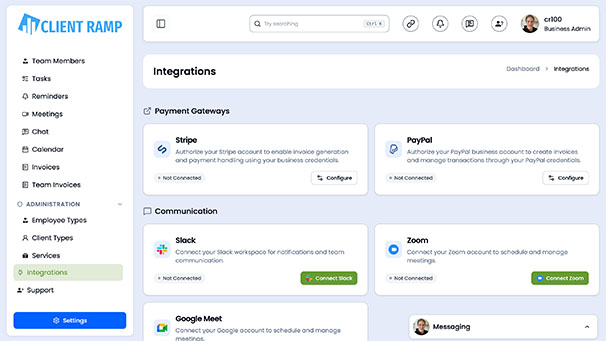
PayPal
 Stripe
 QuickBooks
 Zoom
Zoom Google Meet
 Slack
Slack Zapier
 Mailchimp
How to use our Google Meet API
The Google Meet API tool for ClientRamp enables seamless integration with Google's video conferencing platform, allowing you to create and launch Google Meet sessions directly from within your project management workflow. Using the Google Meet REST API, ClientRamp can programmatically generate meeting spaces, retrieve conference details, and connect your clients and team members to secure video calls without ever leaving the platform. This integration supports meeting creation, participant management, and conference record retrieval — giving you a complete picture of your client communications in one place. By connecting Google Meet to ClientRamp, businesses can streamline project kickoffs, client check-ins, and team collaboration, reducing the time spent switching between tools and keeping all meeting activity tied directly to the relevant project or client account.
Section Title Google Meet API Credentials
Section Desc `To connect Google Meet to ClientRamp, you will need to create API credentials through the Google Cloud Console. Follow these steps:
Log In: Go to the Google Cloud Console at https://console.cloud.google.com and sign in with your Google account.
Create or Select a Project: In the top left corner, click the project dropdown and either select an existing project or click New Project to create one specifically for your ClientRamp integration.
Enable the Google Meet API: From the left menu, go to APIs & Services → Library. Search for "Google Meet API" and click Enable.
Create Credentials: Go to APIs & Services → Credentials and click Create Credentials → OAuth 2.0 Client ID. Select Web Application as the application type. Enter your ClientRamp domain in the Authorized Redirect URIs field.
Download Your JSON Key: Once created, click the download icon to save your credentials JSON file. This file contains your Client ID and Client Secret needed to authenticate the integration.
Configure OAuth Consent Screen: Click on the OAuth consent screen tab and click Publish App to ensure the integration has the correct permissions to connect with ClientRamp.
Enter Credentials in ClientRamp: Navigate to Business Settings inside your ClientRamp dashboard and paste your Client ID and Client Secret into the Google Meet API fields to complete the connection.